
The Only Chromebook Testing Environment That Stops Cheating - Including AI.
✓ Block external resources: Students cannot open additional tabs or browser windows — no opportunity to access AI tools, search engines, or external content
✓ Disable copy/paste: Completely eliminate the ability for students to extract test content to send to AI services or other sources
✓ One-screen focus: Kiosk mode ensures students can only see their quiz — no distractions, no workarounds
✓ Real-time visibility: Monitor all active quizzes at a glance
✓ Multilingual support: 92-language virtual keyboard for diverse learners
✓ Prevent data exfiltration: No screenshots, no printing, no external storage access
✓ Instant deployment: Free app—deployed by Google Admin. Students quiz in seconds
- More...
Installation is simple.
Deploy App
Your Google Admin installs SecureQuiz once. That's it.
Create Resource
Build your quiz in Google Forms (or any platform).
Generate Code
Sign in to SecureQuiz, generate a 5-digit code (students never see the full URL).
Administer
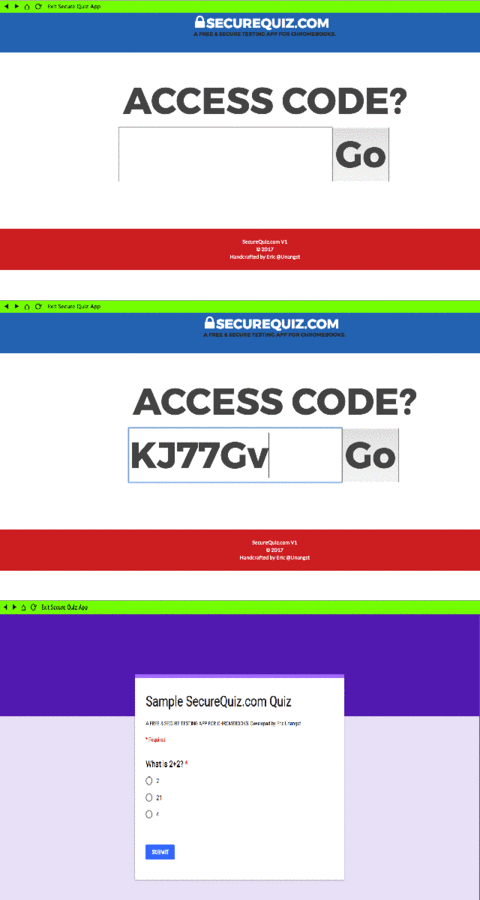
Students enter the code. SecureQuiz locks them in. You monitor live.
Archive & Repeat
Save quiz data, create variants, disable access, run secure assessments semester after semester.
What SecureQuiz Users Are Saying...
"Just deployed app to all my Chromebooks for teachers to use. Works well with #GoogleForms! Teachers are excited to use it." - Eujon A. Troy City Schools, AL"Today our class used @SecureQuiz for the first time. HIGHLY recommend fellow teachers!" - Courtney D. Anderson, SC
Reach out if you'd like use to feature your feedback and praise too!
 Updated for 2026-27.
Compatible with new Chrome OS Versions.
- A Completely Rewritten Installation Guide!- Chromebook Native App. AI Proof. Teacher & Student Friendly.
- Redesigned w/dozens of additional features for 2026-27.
- Supports your ChromeOS LTS (Long-Term Support) channel.
- We're the original locked quiz app for Chromebooks.
- Featuring best in class security for evaluations or links.
Simple Fast Secure
SecureQuiz Demo
SecureQuiz Statistics:
2,818
Total Quiz Codes
726,336
Total Quizzes Given
STOP AI CHEATING!
No copy/paste → Students can't extract questions or send them to ChatGPT
No second tab → Can't load Google or ChatGPT in another window
No window switching → Fullscreen kiosk mode prevents sneaking to another app
Honest Assessment → Know students are answering on their own
-
IP:216.73.217.112.
-
Mozilla/5.0 AppleWebKit/537.36 (KHTML, like Gecko; compatible; ClaudeBot/1.0; +claudebot@anthropic.com)

